If you are a Spectrum Internet, cable TV, phone or other customers, you have a number of options for paying your monthly bill. The options are Spectrum pay bill online, Charter Spectrum payment by phone or making payment through the mail.
Among the payment methods, to pay your Spectrum bill online is the best because even when your services have been voluntarily or involuntarily disconnected, you can pay your bill on Spectrum.net bill pay online but not in the My Spectrum app or any other method.
Paying any kind of bills today is a lot different from what it was a couple of decades ago. You had to write a check and then mail it. Now with the evolution of technology, the concept of Charter Spectrum bill payments has also changed in a diverse way paying a bill is possible with a tap of a finger.
About Charter Spectrum Bill Pay Online
Whenever the question comes about how to pay spectrum bill, everyone refers to spectrum online payment. This article will tell you how you can pay your spectrum bill online.
Charter Communications Cable offers the best value and the most entertainment Tripple Play Packages. With Spectrum Internet, you get whooping deals on high-speed Internet service with Charter. Learn about Charter Spectrum bill pay now.
READ ALSO: How to Make Your Amazon.com Store Card Payment
Spectrum is an online service provider. So, if you are a Spectrum customer and want to make an online spectrum payment to sustain your subscription, follow the simple steps below.
How to Pay Spectrum Bill Online at www.spectrum.net
- To get started, quickly sign in to your account at https://www.spectrum.net/login/
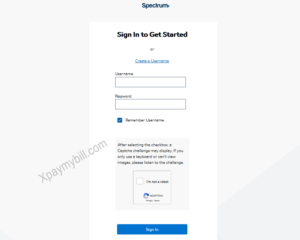
- Enter your Login details in the Login page and click on the “Sign In” button.
- When logged in, go to the Billing section and choose to make a payment.
- Choose a One-Time Payment. At this stage, you can also choose to enroll in AutoPay.
- If you’ve previously saved a payment method, you can select Recent Payment Methods and use the saved information.
- You can also select Add Payment Method. Enter your payment information and payment date and select Continue.
Spectrum Bill Payment Methods Include:
- Checking or savings account
- Debit card
- Credit card
- Here, you can choose to Save for Future Payments. Your payment method can then be used for one-time payments in the future.
- Confirm your payment details to finish your Charter Spectrum bill payment process.
Note: That Spectrum payments made or scheduled after the due date may be subject to late fees and/or collection activity. When a payment is scheduled, you’ll receive an email notification at the email address we have on record.
How to Cancel a Spectrum One-Time Payment
To cancel a future-dated Charter Spectrum one-time payment:
- Login to your account at https://www.spectrum.net/login/
- Select Cancel Payment in the Billing section.
- Select Cancel Payment to confirm.
How To Pay Your Spectrum Bill Using the My Spectrum App
You can also pay your bill on your mobile device using the My Spectrum app. To do so, follow the steps below.
- Download the Charter Spectrum Mobile iOS or Android Application.
- After download, then Sign in to the My Spectrum app using your Spectrum username and password.
- On the Mobile Application, Select the Billing tab and click the Make Payment button.
- From here, you can adjust the Payment Amount, the Payment Date and the Payment Method. Tap whichever field you want to adjust.
- Provide your payment information. Make sure they are correct, then Tap Make Payment. You’ll receive a confirmation message immediately confirming your payment. This is only if it is successful.
Note that the maximum payment that can be made using the online portal or the My Spectrum app is $1,000.
How to Pay Your Charter Spectrum Bill By Phone Number
Charter Spectrum has provided an automated service system that helps their customer to pay their bills over a phone call. To make your Spectrum payment, call (833) 267-6094.
RELATED: How to Pay Your Comcast Xfinity Bill Online
You can use the company’s automated service to pay your Charter bill over the phone. Spectrum Payment over the phone accepts payment using your:
- Checking or savings account
- A debit card or MasterCard, Visa, American Express, or Discover credit card
Note: If you choose to make your Spectrum payment by phone with the assistance of a customer service agent, you’ll be charged a $5.00 processing fee.
How to Make Charter Spectrum Bill Pay By Mail
If you want to use the mailing method to pay your Charter bill, you can mail your payment to the company. To find the Spectrum payment address, refer to your billing statement, which you can find online by signing into your account at Spectrum.net and visiting the billing section.
Remember the following when using the Spectrum payment by mail method to offset your bill.
- Mail your payment in the envelope with the remittance portion of your statement whenever possible.
- You can print a copy of your statement through your Spectrum account.
- Note your Spectrum account number on your check or money order.
- Do not mail cash.
Another means of making payment is in-person at any Spectrum Stores.
How to Make Spectrum.net Payment In-Person
Spectrum has its own stores and also partners with others to accept payments. Go here Use the store locator to find your nearest Spectrum Store
Spectrum stores accept the following forms of payment:
- Checking or savings account
- A debit card or MasterCard, Visa, American Express or Discover credit cards
- Cash and money orders
If you have further questions on how to make your Spectrum Pay Bill Online, by phone or through the mail, use the comment section below to reach us or you can call The Spectrum customer service phone number for payments at 833-267-6094.