
If you’re a new customer or have never signed in to your account, we are going to walk you through on how to create a Spectrum username and a strong password which no one else to be able to access without your permission. We shall also show you how to create a Spectrum email account from your internet package account.
When you create a Charter Spectrum username and password, it allows you to sign in to Spectrum.net and take advantage of Charter Communications’s full range of services, including viewing and paying your bill, making changes to your account and more.
When you create your Spectrum username and password, by default it becomes the Primary username which you can use to add additional users. As a new customer, you can create up to five Spectrum usernames, that simply means that other members of the household can create their own.
RELATED: How to Create a New Charter Spectrum Email Account
Now without wasting much time, let us show you the different ways to create a new Spectrum username and password with ease.
How to Create a New Spectrum Username Online Using Your Email Address
If you want to create a new Spectrum username online using your email address or phone number, follow the simple steps below.
- Go to Spectrum.net homepage and select the Menu icon in the upper left-hand corner then select Create a Username.
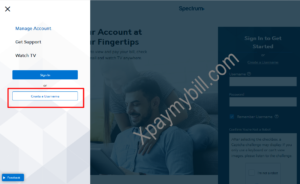
- Select Contact Info and enter the primary telephone number or email address associated with your account.
- Confirm that you’re not a robot and select Continue.
- Verify Your Identity by receiving a code via text, email or a phone call.
- Enter the verification code on the next screen.
- Check Your Info: First name, last name, contact email address and phone number.
- Choose Your Username: You can use your email address as your username, or create a new username.
- Enter Your Password: Create a password (follow the guidelines to create a strong password) and select your security question and answer.
- The first username you create will be your Primary and will have full privileges on Spectrum.net.
How to Create a Spectrum Username Using My Spectrum App
To create a username for the My Spectrum app using your email address or phone number, follow the guideline below.
- Open the My Spectrum app.
- Select Create a Username.
- Select Contact Info and enter the primary telephone number or email address associated with your account.
- Confirm that you’re not a robot and select Continue.
- Verify Your Identity by receiving a code via text, email or a phone call.
- Enter the verification code on the next screen.
- Check Your Info: First name, last name, contact email address and phone number.
- Choose Your Username: You can use your email address or phone number as your username, or create a new username.
- Enter Your Password: Create a password (follow the guidelines to create a strong password) and select your security question and answer.
- The first username you create will be your Primary and will have full privileges on Spectrum.net.
After creating your new Spectrum username, you’ll need to wait up to 72 hours before you can use it to sign in to the Spectrum TV app or any TV channel apps.
Guidelines to Create Spectrum Username/Password Strong
Usernames must follow these guidelines:
- Usernames must have at least six (6) characters.
- We recommend using a combination of letters, numbers and special characters:
- Letters (Aa–Zz)
- Numbers (0–9)
- The only special characters allowed are. (dot), – (dash) or _ (underscore).
- Spectrum usernames must not begin or end with symbols.
- Your usernames must not include consecutive symbols.
We hope the guidelines above on how to create a Spectrum username and a strong password was helpful? if yes, use the comment section below to give us feedback.